Swapping tokens on Base means trading one token for another directly from your own wallet, at the going price, on the Base network. You need a wallet that supports Base, a little ETH on Base to pay the network fee, and the token you want to give up. Then you pick the pair, check the quote, approve if asked, confirm, and read the result on a block explorer. This guide walks through each step, shows where swaps go wrong, and ends with how the same routine applies when you swap into CATFOOD, a community token on Base that sends part of its creator rewards to cat shelters.
TL;DR
- A swap is a one-step trade of one token for another from your wallet. You need a Base-compatible wallet, ETH on Base for gas, and the token you are selling already on Base.
- Before you confirm, read four numbers: the expected output, the fees, the price impact and the slippage tolerance.
- Approve only the amount you are swapping, and verify the token's contract address, not just its ticker.
- Your transaction hash is your receipt. Open it on Basescan to see what actually moved.
- To swap into CATFOOD, which routes part of its creator rewards to cat shelters, use the purchase links on catfoodcoin.com and follow the same routine.
Table of Contents
- What a Base token swap actually is
- What you need before you start
- Swapping tokens on Base, step by step
- Checking that your swap went through
- When a swap is pending, fails or pays less than expected
- Spotting an unsafe approval or a fake token
- Swapping into CATFOOD
- Fees at a glance
- FAQ
- Sources
What a Base token swap actually is
Base is an Ethereum layer-2 network built by Coinbase. It runs the same smart contracts as Ethereum mainnet, but transactions cost a fraction as much, which is why small swaps make sense there (Orkid Labs). A layer-2 is a separate network that settles back to Ethereum, so it is faster and cheaper to use.
A swap happens on a decentralized exchange, or DEX: a set of smart contracts holding pools of tokens, rather than a company matching buyers and sellers. When you swap through a wallet such as Coinbase Wallet, the funds go straight from your wallet to the DEX. The swap executes at a price within the slippage you set on the confirmation screen. If the price moves outside that range, the transaction is canceled and your funds return to your wallet.
Two things follow from this:
- You keep control of your tokens until the moment the swap executes. No account is opened and nobody holds your balance.
- Nothing can be undone afterward. Once a transaction is confirmed on-chain, it is final, so the checks you do before you sign are the ones that count.
What you need before you start
Three things, and missing any one is the most common reason a first swap stalls (Orkid Labs):
- A wallet that supports Base. Most mainstream self-custody wallets do. Coinbase's own help pages list Base among the networks its wallet's swap feature supports.
- ETH on Base. Base uses ETH as its native gas asset, so even if you are swapping two other tokens you need some ETH on the network to pay the fee (USDC).
- The token you are selling, on Base. Tokens sitting on Ethereum mainnet, Arbitrum or Optimism must be bridged to Base first. A bridge moves a token from one network to another.
How much ETH is enough? Fees are small. Coinbase's guide says converting $10 of ETH to USDC on Base through its Trade feature may incur around $0.20 in network fees, set by network activity rather than by Coinbase. Fees move with demand, so treat that as an example, not a promise, and read the fee line on your own quote.
Swapping tokens on Base, step by step
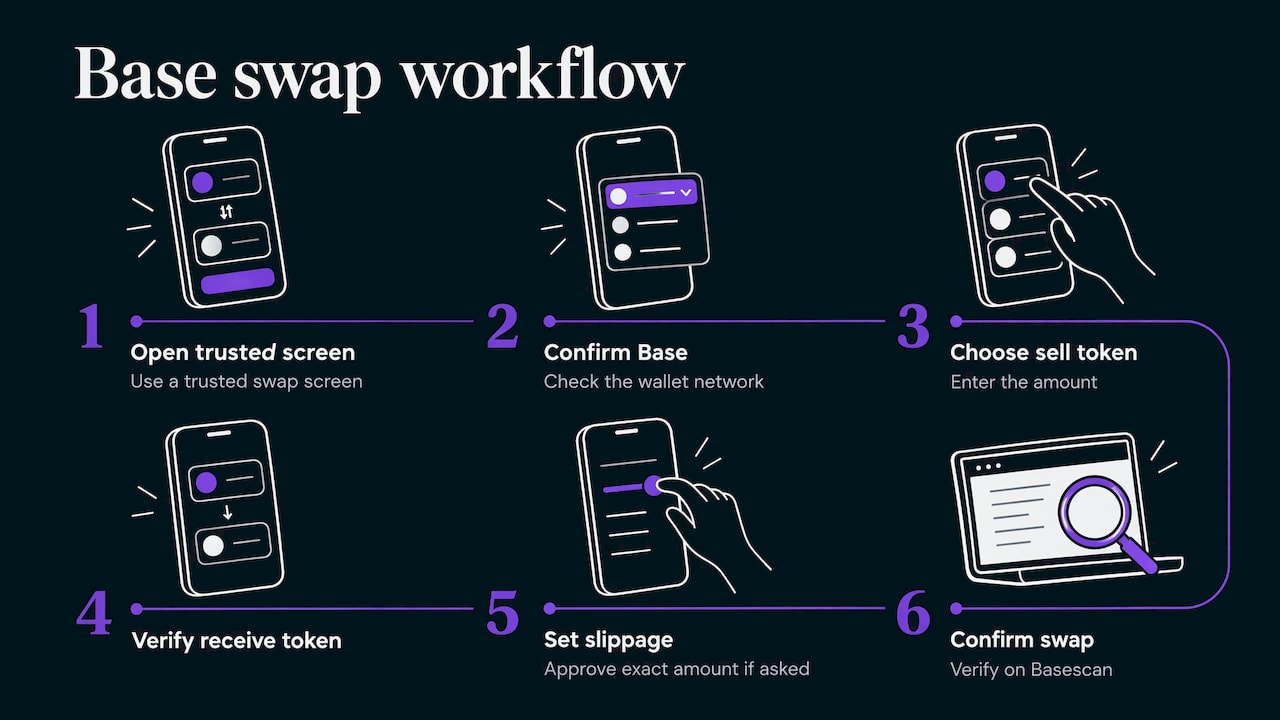
1. Open the swap screen from a trusted place
Use the swap feature inside your wallet app, or a DEX you reach from a bookmark or an address you typed yourself. Never arrive from a search ad or a link someone sent you. Fake front-ends can look identical to the real thing, and the USDC team advises verifying the official DEX website to avoid scams.
Where it goes wrong: a lookalike site asks you to connect and then proposes a transaction that does something other than a swap. Connecting a wallet only shows the site your address, but signing is what moves funds, so slow down at the signing step.
2. Confirm you are on Base
Check the network selector in your wallet before anything else. The most common beginner mistake is swapping on Ethereum mainnet by accident, where gas can run 50 to 100 times higher. If your balance shows zero, you are probably looking at the wrong network.
3. Choose the token you pay with and the amount
In Coinbase's Base trading flow you open the Wallet tab, tap Trade, pick the asset to trade out and enter an amount, then choose the asset to receive. Other wallets and DEX screens use the same logic: from-token, amount, to-token.
If the swap fails with an insufficient balance error, you are trying to swap more than you hold. If it reports insufficient liquidity, there is no route for that pair or size, so try a different pair or amount.
4. Choose the token you receive, and verify it
Tickers are not unique. Anyone can deploy a token with any name. CoinGecko advises checking the contract address against a vetted source, because lookalikes exist on Base, for example a bridged version of USDC that is a different token from the native one. Paste the contract address from the project's own official page rather than searching by name.
5. Read the quote
Before you confirm, find these four lines:
| What to read | What it tells you |
|---|---|
| Expected output | How many tokens you should receive at the quoted price |
| Fees | Network gas paid in ETH, plus any pool or interface fee |
| Price impact | How much your own order moves the pool's price; it grows with order size |
| Slippage tolerance | The worst price you will accept before the swap cancels |
Pool fees depend on the pool. Uniswap-style pools on Base, for example, charge 0.01%, 0.05%, 0.3% or 1% depending on the pool, with the fee included in the quoted output. Some wallets add their own fee on top, so the quote screen is where you see the total.
6. Set slippage sensibly
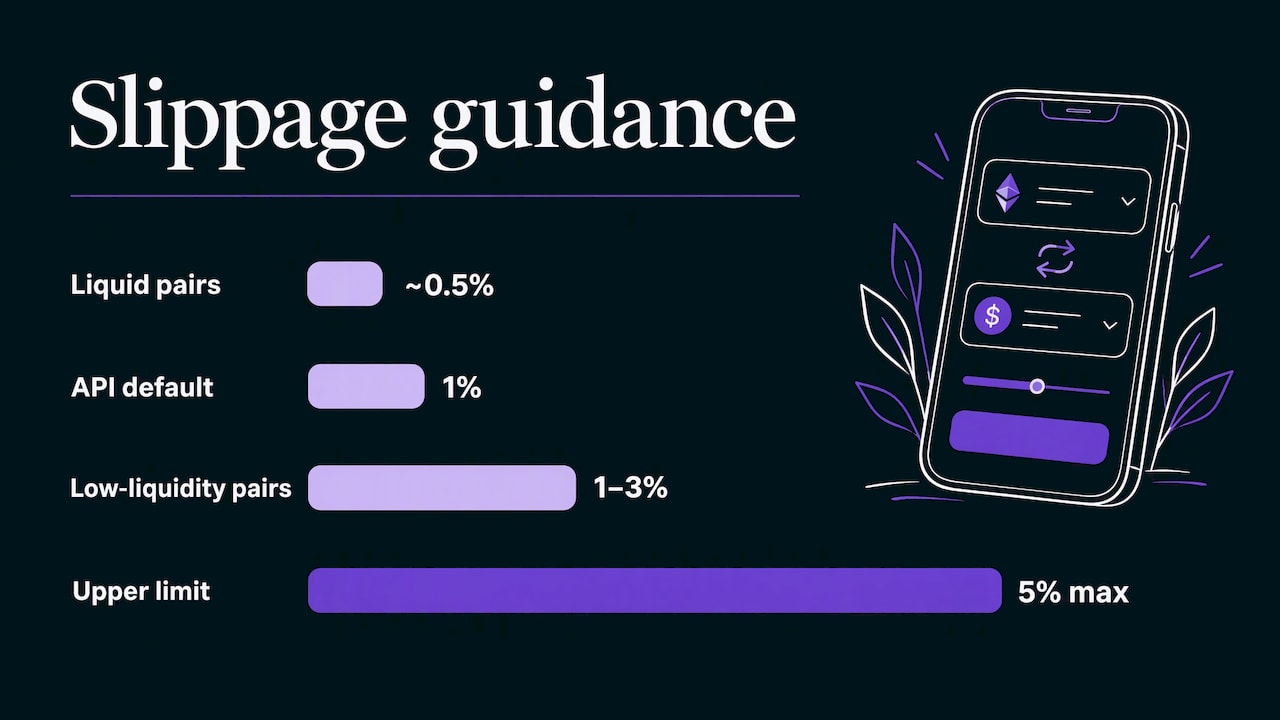
Slippage tolerance is the maximum difference you accept between the expected price and the actual execution price, which can arise from market volatility or thin liquidity. In Coinbase's app you change it through Fees and the gear icon. Developer documentation for Coinbase's swap API uses a default of 100 basis points, or 1%, where one basis point is 0.01%. If the price moves beyond the threshold between quote and execution, the transaction reverts.
A workable rule of thumb from one swap guide: about 0.5% for liquid pairs, 1 to 3% for volatile or low-liquidity pairs, and never above 5% unless you know why. High slippage makes you a target for sandwich attacks, where a bot trades just before and after you to profit from your price move.
7. Approve the exact amount, if asked
The first time you sell a token on a given DEX, your wallet usually asks for an approval, which lets a contract move that token on your behalf. Native ETH needs no approval (CDP docs). For ERC-20 tokens, CoinGecko warns that apps may autofill an infinite allowance, which is bad practice and can expose your wallet. Approve only the amount you are swapping, and revoke unused approvals now and then.
Base's developer documentation is explicit about the target of an approval: approve the spender address the API returns, only for the sell amount, and never the settler contract itself. As a user, the practical lesson is simple: if the wallet shows an approval for an address you do not recognize as the DEX you chose, reject it.
8. Confirm and wait
Read the wallet popup once more: network, token, amount, spender. Then confirm. In Coinbase's Base flow you swipe to confirm, and the swap goes through as a single transaction. Base blocks arrive quickly, so most swaps settle in seconds.
9. Verify on Basescan
See the section below. Do not skip this step the first few times.
Checking that your swap went through
Your wallet or app shows its interpretation of what happened. The block explorer shows what was recorded. The explorer for Base is Basescan, and you search it with your transaction hash, the long string your wallet gives you after you confirm.
On the transaction page, look for:
- Status: success, failed or pending.
- From: your own wallet address.
- Token transfers: the amount you spent and the amount you received.
- Contract of the received token: it should match the address you verified in step 4, not just carry the same ticker.
- Fee: close to what the wallet showed before you confirmed.
If the app balance and the explorer disagree, trust the explorer, since it reads the chain directly. Reading a transaction never requires you to sign anything. A page that asks you to connect a wallet and sign in order to "see details" is a red flag.
When a swap is pending, fails or pays less than expected
Most problems have a plain cause.
- Failed. A failed status does not mean nothing happened: gas was still consumed, but the token movements were reverted, so you keep your tokens. The usual cause is that the price moved past your slippage limit. Get a fresh quote and try again, and on a thin pair consider a smaller order.
- Pending for a long time. The fee was probably too low. A stuck transaction can be replaced by sending a new one with the same nonce and a higher fee, which is what the speed up and cancel buttons in many wallets do.
- Insufficient gas. You hold tokens but not enough ETH on Base. Add a small amount of ETH to the network and retry.
- Less received than you hoped. Either the price moved or your order had more price impact than you noticed. On a shallow pool, splitting the order into smaller swaps usually helps.
- Token not visible after success. Your wallet may simply not display it yet. Add the verified contract address as a custom token.
Can a swap be reversed? No. There is no support desk on a smart contract, and a confirmed swap is a final trade. That is the reason the pre-confirmation checks matter more than anything you can do afterward.
Spotting an unsafe approval or a fake token
A few patterns account for most losses:
- An approval request for an address that is not a DEX router, a very large allowance, or an approval that shows up inside a transaction that was supposed to be something else, such as a free claim. Wallet-drainer scams leave exactly these traces.
- A token whose swap needs unusually high slippage to go through. Treat a requirement of 10% or more as a signal about the token, not a setting to raise.
- A link from a social post, direct message or ad instead of the project's official site.
If you spot an approval you do not want to keep, revoke it by setting a new approval to zero, using your wallet's approval manager or a revoke tool from a source you trust.
Swapping into CATFOOD
Everything above applies when the token you are receiving is CATFOOD. CATFOOD is a community token on Base. Trading activity in its CATFOOD/BASECAT pool generates creator rewards, and the project allocates 50% of those rewards to cat shelters, including Steelton Community Cats and Loving Care Cat Rescue. Our site reports more than $530 donated to shelters so far.
That is the point of choosing CATFOOD for your swap: the trade you make is the same trade, but part of the rewards it generates goes to cats in need, and you can follow the money. Donation receipts and wallet balances are verifiable on-chain, and the site carries a live pool and donation-wallet tracker, burn-address tracking, staking information and community updates.
Here is how the routine maps onto CATFOOD:
- Open catfoodcoin.com from a bookmark or by typing it, and use its token purchase links.
- Make sure your wallet is on Base and holds some ETH for gas.
- Choose the token you are paying with and the amount.
- Confirm the CATFOOD contract address matches the one on the official site before you approve anything.
- Check the quote, set slippage for a smaller-cap community token (the 1 to 3% range suits low-liquidity pairs) and approve only the amount you are swapping.
- Confirm, then open the transaction hash on Basescan and check that the CATFOOD transfer arrived.
Once you hold CATFOOD, the same site lets you look at the donation-wallet tracker and the community reports, so your support does not rest on trust alone. Community tokens are volatile and a swap is a trade, so size it as you would any crypto purchase and never put in money you cannot spare.
Fees at a glance
| Cost | Who gets it | Typical scale on Base |
|---|---|---|
| Network gas | Network validators, paid in ETH | Cents for a typical swap, rising when the network is busy |
| Pool fee | Liquidity providers | Commonly 0.01% to 1% depending on the pool |
| Wallet or interface fee | The wallet or app, if it charges one | Varies by app; shown on the quote screen |
| Price impact | Not a fee; the effect of your order size on the price | Grows with order size relative to the pool |
In short, the fee you pay is the sum of the lines your quote screen shows. If something on a quote is not explained, do not sign yet.
FAQ
Do I need ETH to swap tokens on Base?
Yes. Base uses ETH as its gas token, so every swap needs a little ETH on the Base network to pay the network fee. If you hold tokens but no ETH, the wallet reports insufficient gas and the swap cannot go through. Add a small amount of ETH on Base first.
Why did my Base swap fail, and did I lose my tokens?
The usual reason is that the price moved beyond your slippage tolerance before the transaction executed. A failed swap still costs gas, but the traded tokens return to your wallet. Request a fresh quote, and reduce the order size if the pair is thin.
What slippage should I use?
For liquid pairs, a low setting of roughly 0.1% to 0.5% is common. For volatile or low-liquidity tokens, 1% to 3% is a typical range, and anything above 5% deserves a reason. Higher slippage widens your exposure to sandwich bots.
Can I undo a swap on Base?
No. Confirmed on-chain transactions are final. The only way back is a new swap in the opposite direction, which costs gas and fees again at whatever the price is by then. Check the quote carefully before you sign.
How do I know my swap into CATFOOD worked?
Copy your transaction hash from your wallet and open it on Basescan. You should see a successful status, your wallet as the sender, and a CATFOOD transfer to your address. Add the token's contract address to your wallet if the balance is not displayed.
Sources
- Swap using a DEX - Introduction, Coinbase Help
- Buy and trade on Base, Coinbase Help
- Swaps, Coinbase Developer Platform docs
- Integrate Trading, Base docs
- How to swap tokens with Coinbase Wallet
- How to Get USDC on Base
- Crypto Masterguide: How to Swap Tokens, CoinGecko
- How to Read a Blockchain Transaction
- How to Swap Tokens on Base: A Beginner's Guide